
Denver Web Design & Internet Marketing Platform Overview
Create a customized experience for your audience with our easy-to-use tools. Eliminate the wasted effort and control your business from your website. Managing your web presence has never been so efficient!
Contact us

Everything your business runs on, one login
Every Denver Website Designs site is built on Omnia, our completely rebuilt admin. Your website, contacts, sales pipeline, email marketing, forms, content and online store all live in one place. Here is a look inside.
Your Dashboard
Log in and every tool is one click away. Color-coded tiles organize your Site, CRM, Email, Forms and Content tools, while live panels show how your website and marketing are performing today.
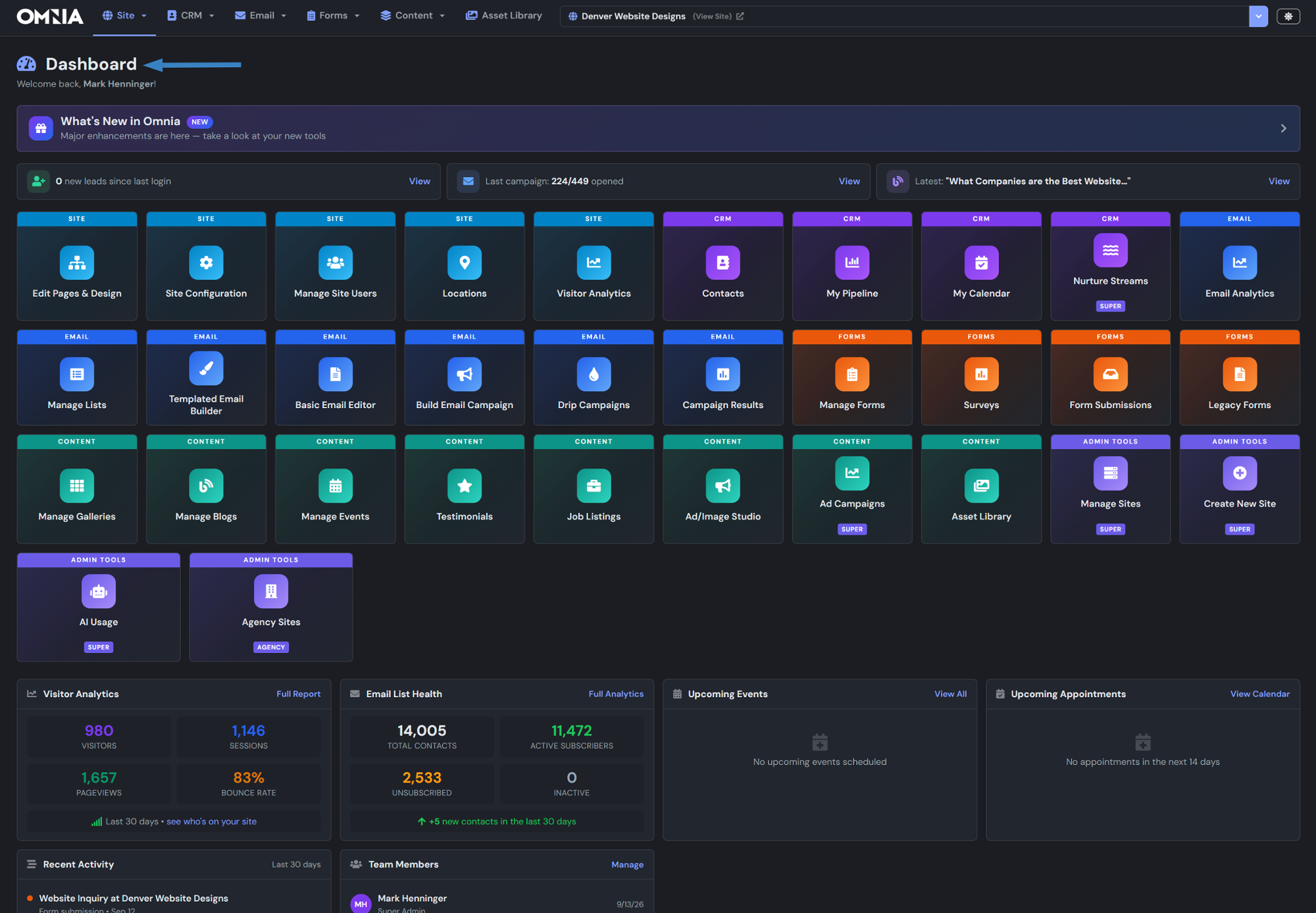
- New leads since your last login
- Latest campaign opens and newest blog post
- Visitors, sessions, pageviews and bounce rate
- Email list health and new contacts
- Upcoming events and appointments
- Recent activity and team members
Build and edit without code
Design pages visually, manage your navigation and keep every image organized. Developers still get full access to source, CSS and JavaScript.
Omnia Studio Page Editor
Site Edit Pages & Design
Click anything on the page to edit it. Add sections from templates, fine-tune images, ask the built-in AI for help, preview every screen size and publish when you are ready.
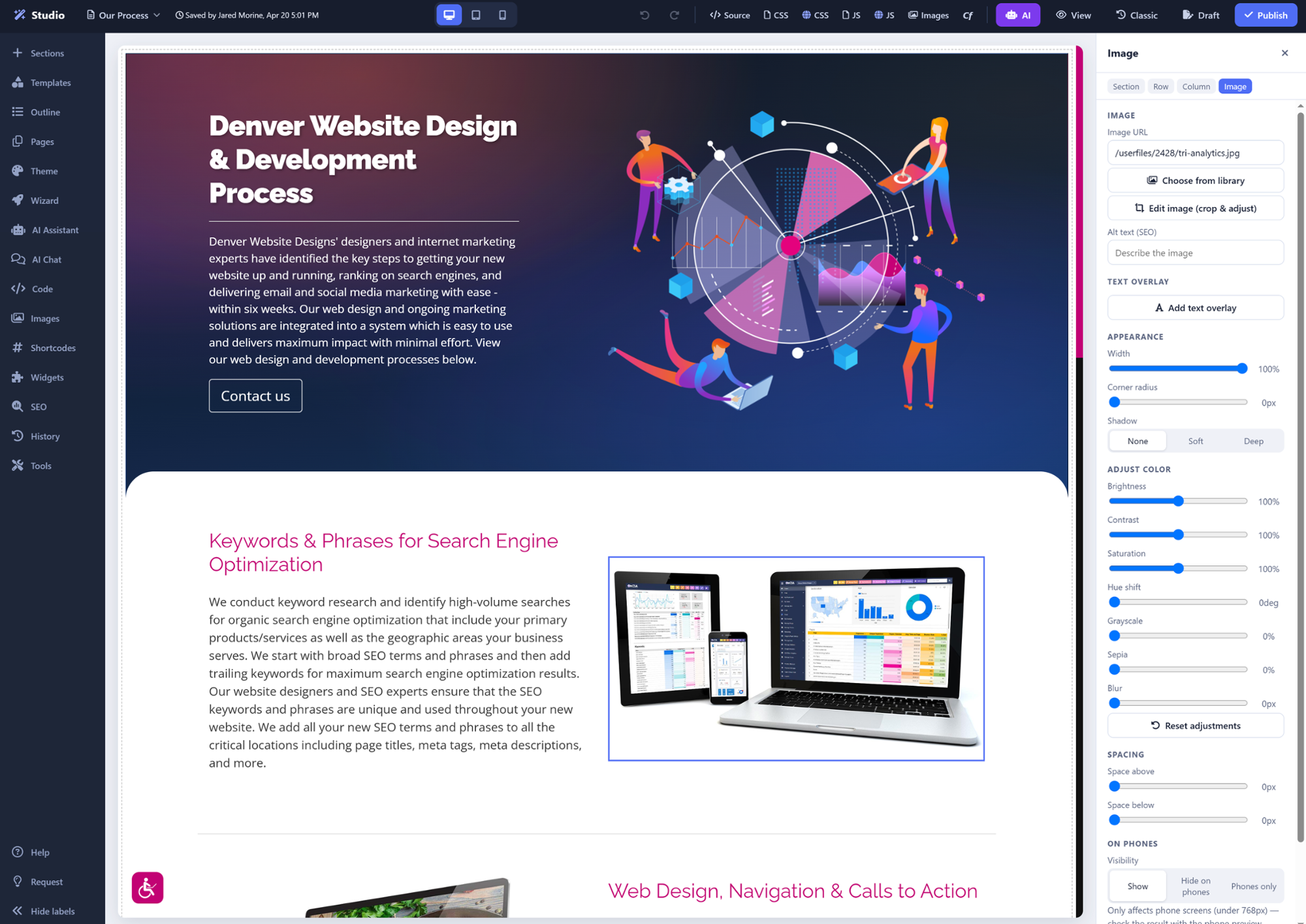
- Drag-and-drop sections and templates
- AI Assistant and AI Chat built in
- Desktop, tablet and phone previews
- Crop, color-adjust and add SEO alt text to images
- Show or hide content on phones
- Drafts, page history and one-click publish
Pages & Navigation
Site Pages
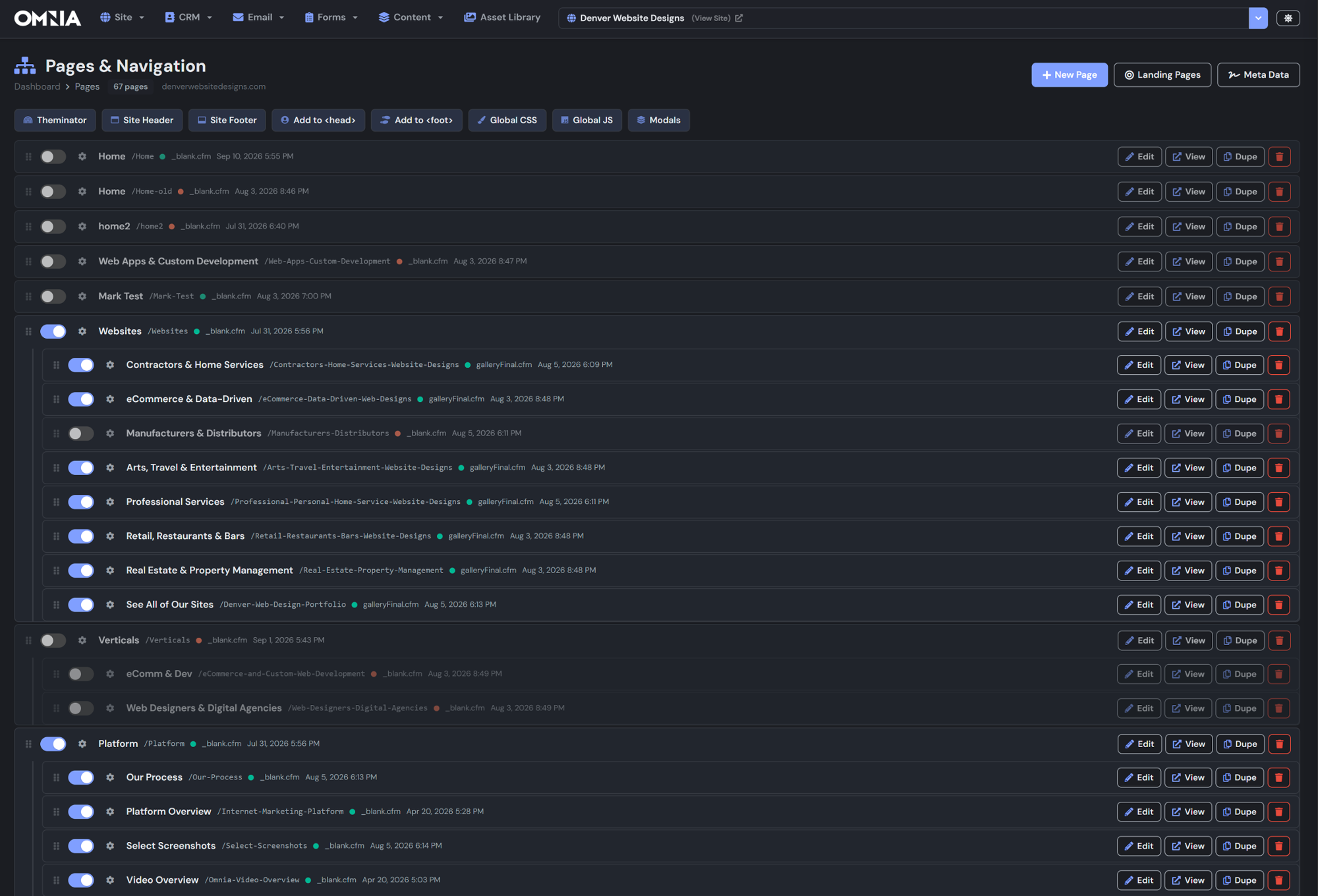
Your whole site map on one screen. Drag pages to reorder the menu, switch pages on or off and duplicate a page to start a new one in seconds.
- Drag-and-drop menu and sub-pages
- Toggle pages live or hidden instantly
- Landing pages and SEO meta data
- Global header, footer, CSS and JS
- Theminator for site-wide colors and fonts
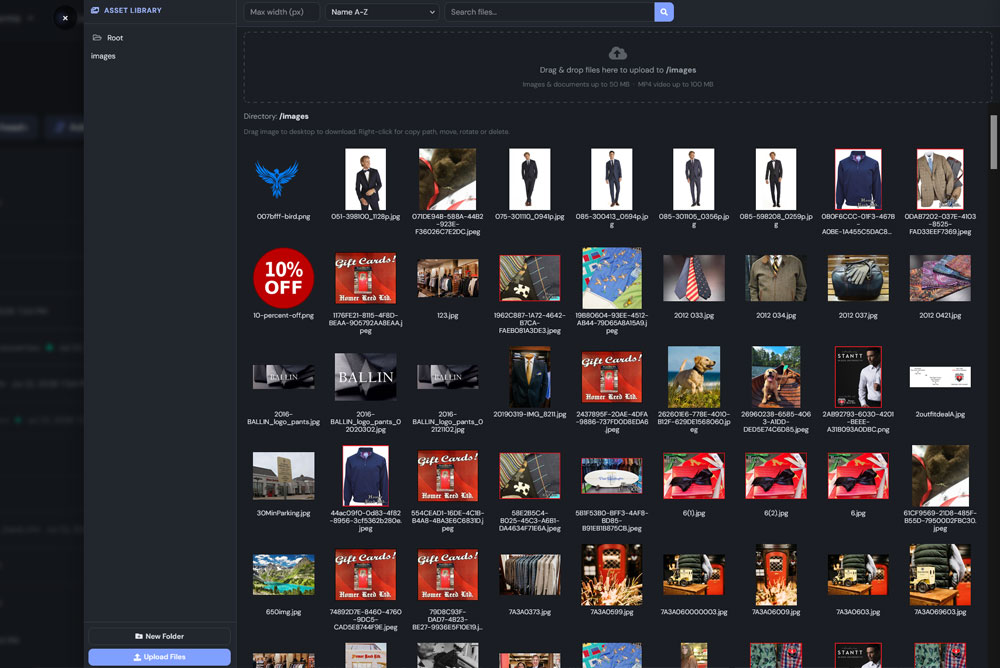
Turn leads into closed deals
Every form fill, email open and site visit lands on the contact record, so your team always knows who to call next and what each deal is worth.
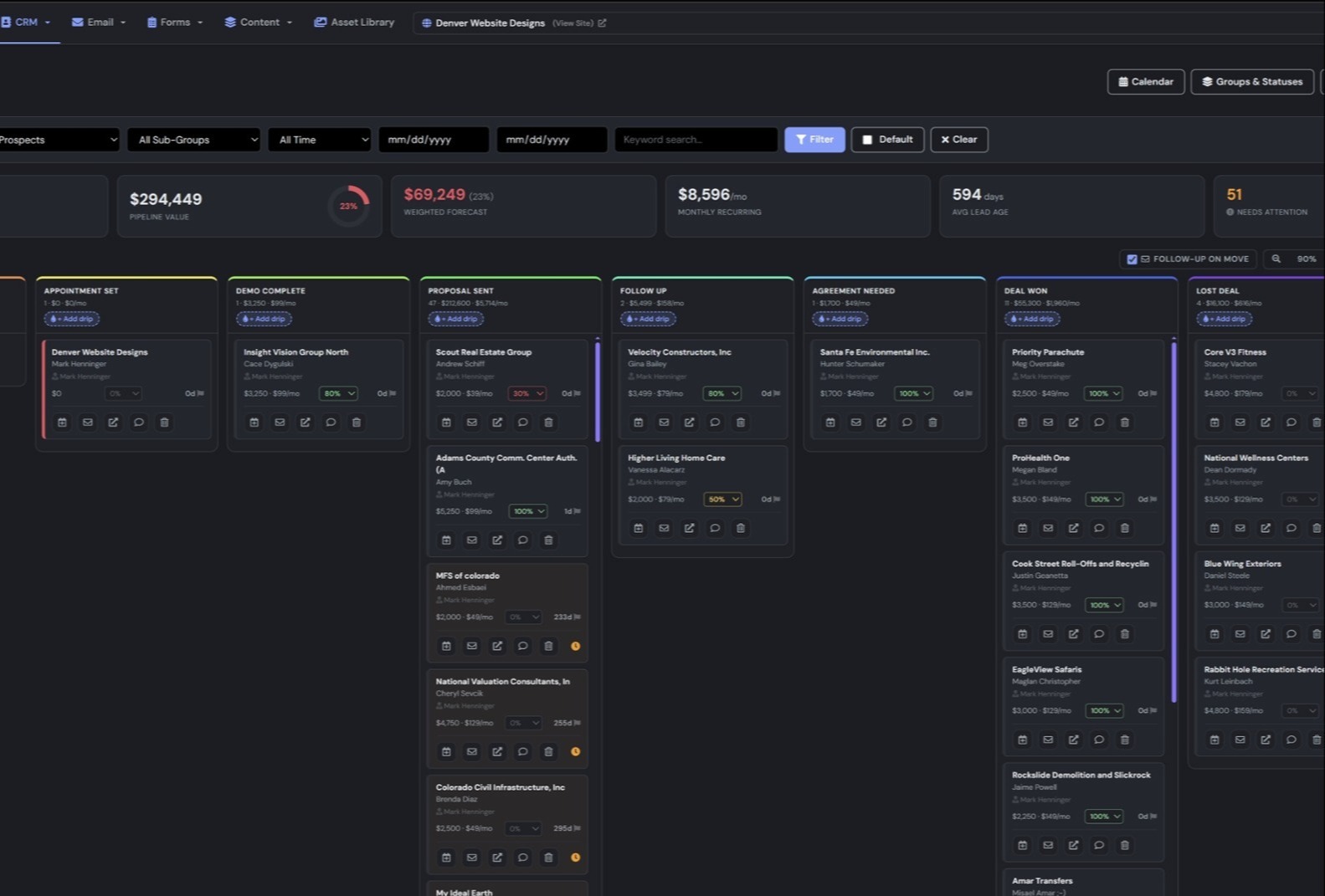
Pipeline Board
CRM My Pipeline
See every deal by stage, from appointment set to deal won. Drag a card forward and Omnia can send the follow-up for you.
- Pipeline value, weighted forecast and monthly recurring revenue
- Close probability on every deal
- Attach drip campaigns to any stage
- Follow-up on move and "needs attention" flags
- Custom groups, statuses and calendar
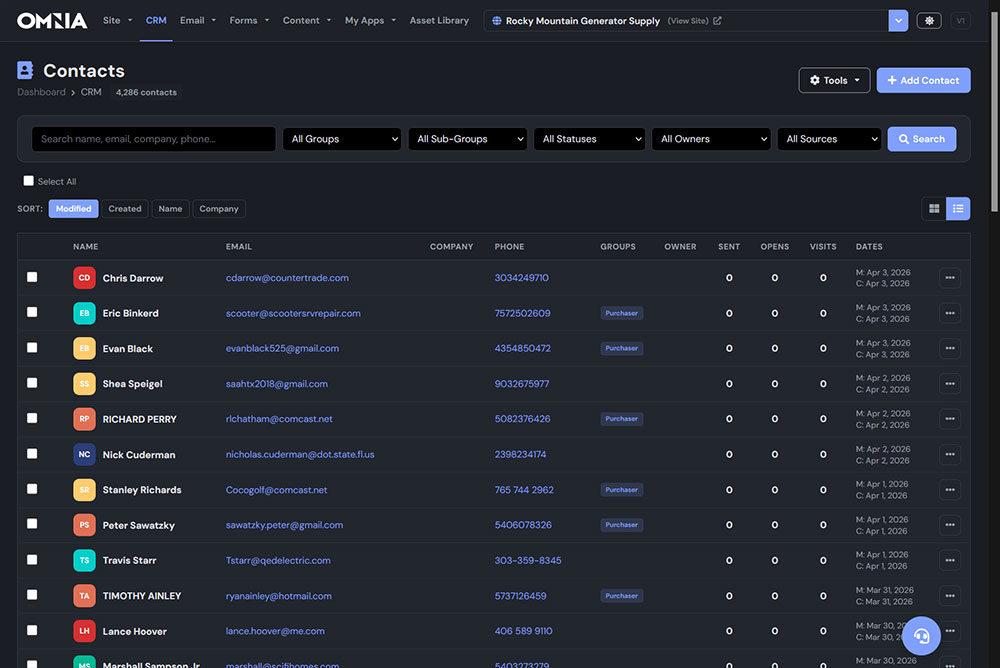
Contacts
CRM Contacts
Thousands of contacts, searchable in a second. Filter down to exactly the people you need and see how engaged each one is.
- Filter by group, sub-group, status, owner and source
- Emails sent, opens and site visits per contact
- Assign owners and route new leads
- Grid and list views with quick sorting
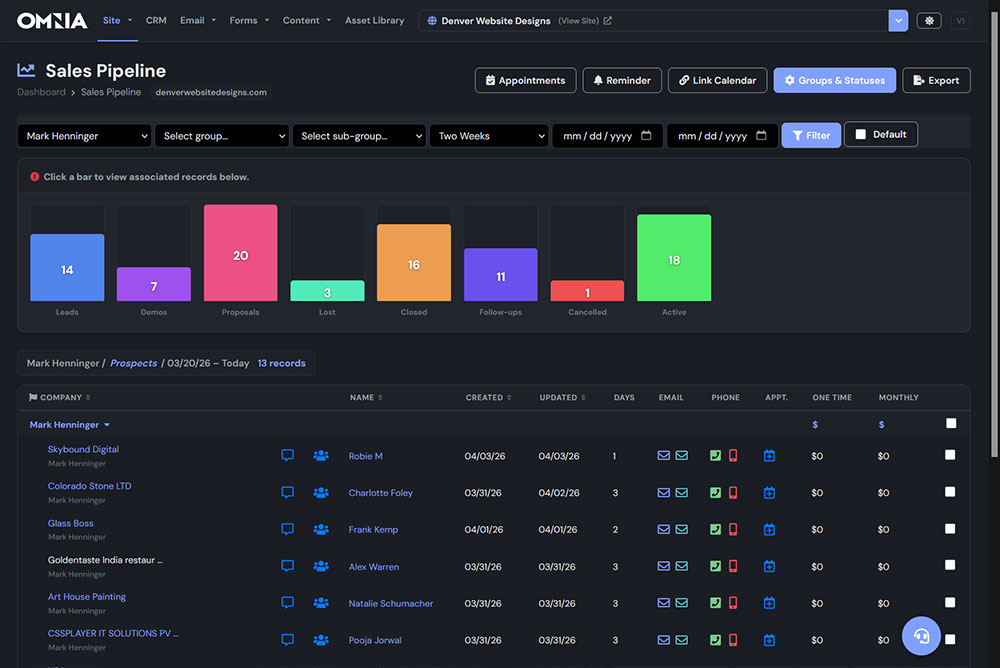
Sales Pipeline Reports
Site Sales Pipeline
Click any bar to pull up the records behind it. Leads, demos, proposals and closed deals for any rep and any date range.
- Filter by rep, group, sub-group and dates
- One-click email, call or appointment
- One-time and monthly deal values
- Reminders, linked calendar and export
Campaigns that prove their worth
Design a newsletter, send it to the right segment of your CRM and watch the results roll in, all without a separate email service.
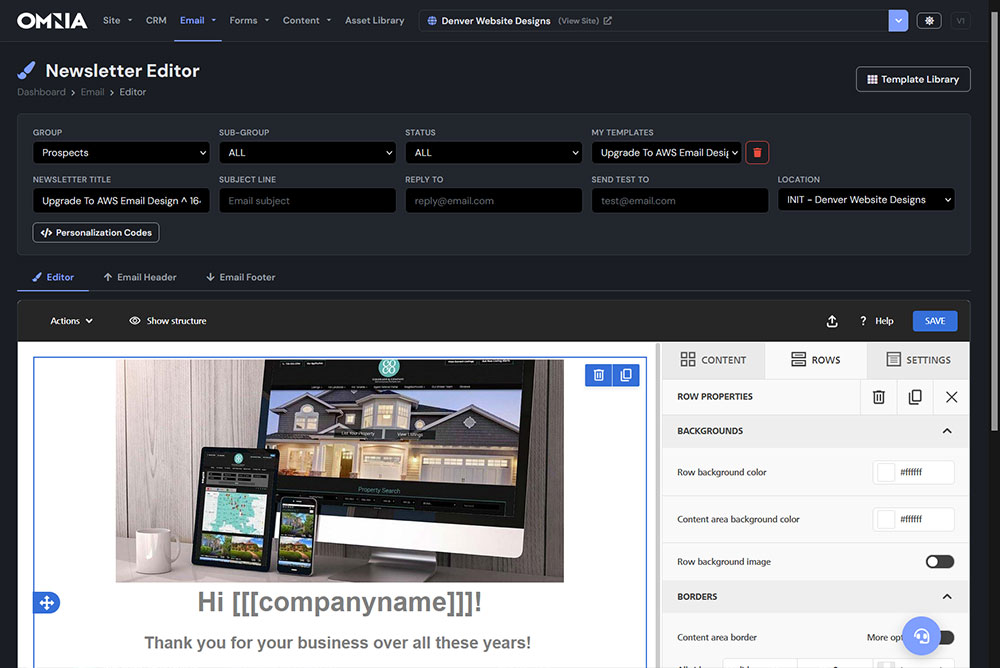
Newsletter Editor
Email Build Email Campaign
Start from the template library or a blank canvas, drag in content blocks and personalize every send with names and company details.
- Visual drag-and-drop email builder
- Template library and saved templates
- Target by group, sub-group and status
- Personalization codes and test sends
- Branded email header and footer
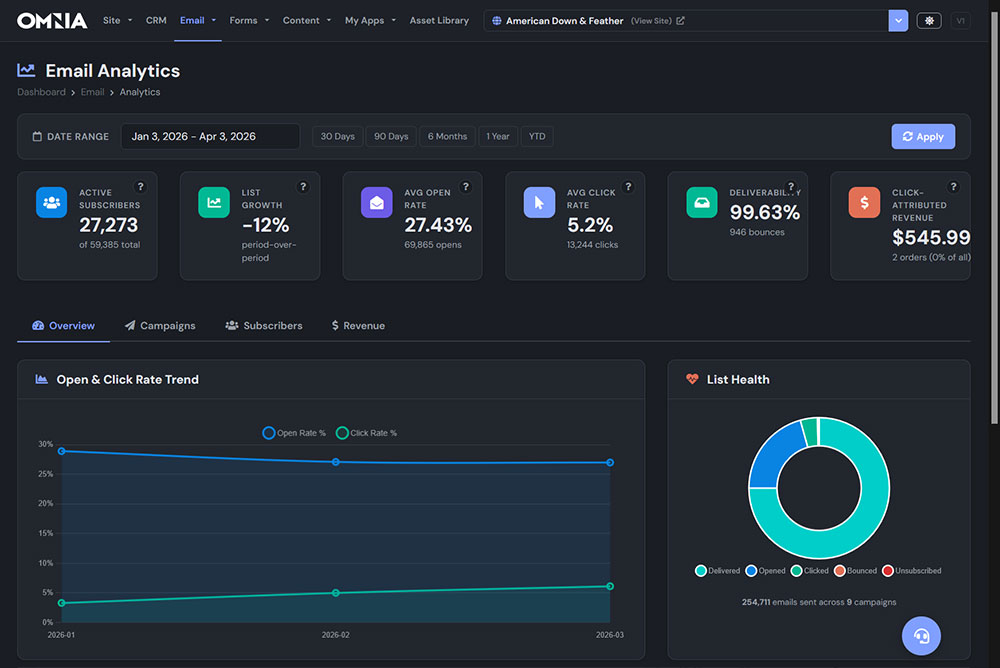
Email Analytics
Email Email Analytics
Know what is working. Track engagement across every campaign and see the revenue your emails bring in.
- Active subscribers and list growth
- Open and click rate trends
- Deliverability and list health
- Click-attributed revenue
- 30 days, 90 days, 6 months, 1 year or YTD
Capture leads and publish with AI
Build forms that send new leads straight into your CRM, then keep your site fresh with a blog editor that writes alongside you.
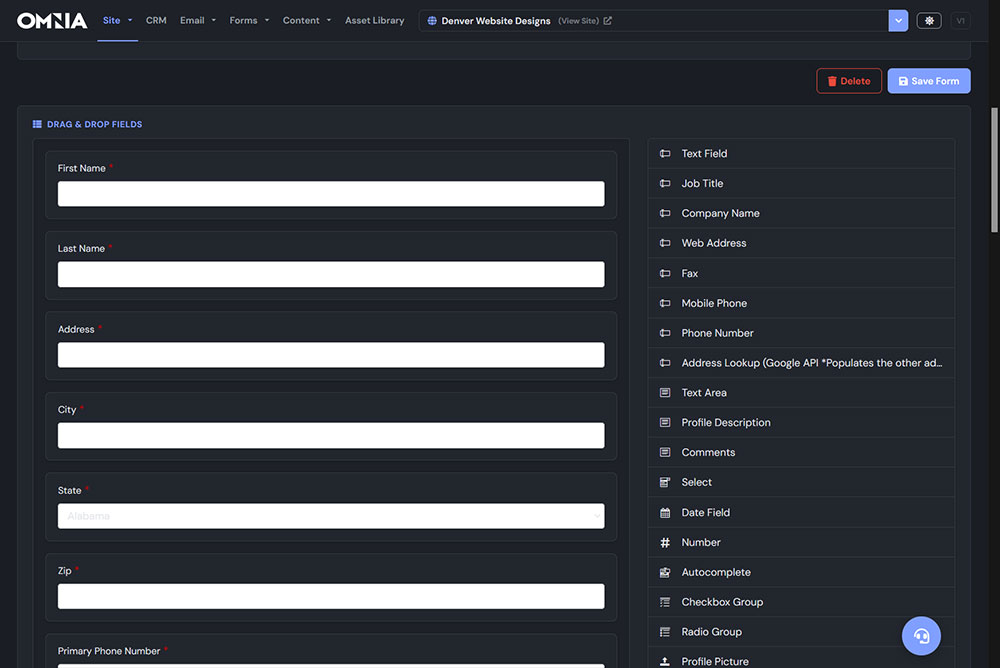
Intelligent Form Builder
Forms Manage Forms
Drag fields into place and your form is live. Every submission creates or updates a CRM contact automatically.
- 20+ field types, from dates to checkbox groups
- Google address lookup fills in the rest
- File and profile picture uploads
- Required fields and custom labels
- Surveys and a submissions inbox
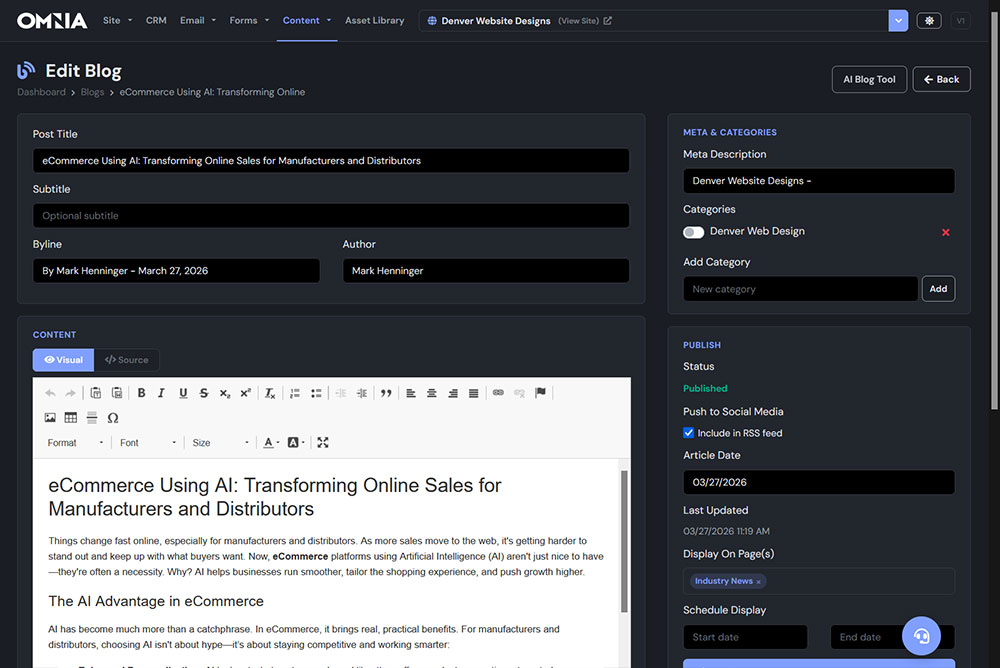
Blog Editor
Content Manage Blogs
Write, format and schedule posts in one screen, then share them everywhere your customers are.
- Rich text editor with a source view
- Categories and SEO meta descriptions
- Scheduled start and end dates
- Push to social media and RSS
- Choose which pages display each post
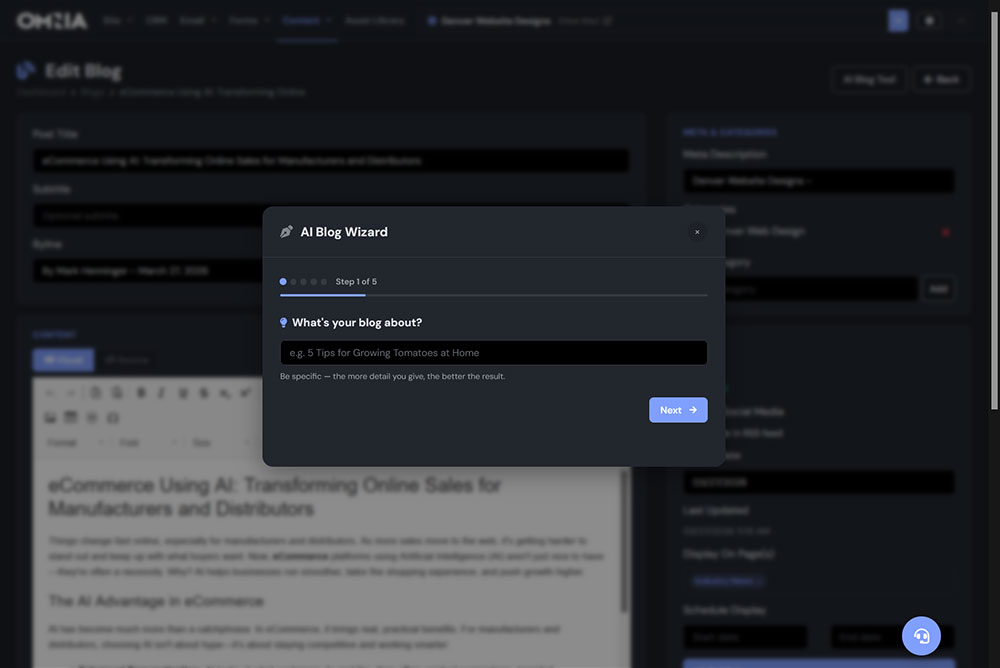
AI Blog Wizard
Content Manage Blogs AI Blog Tool
Tell the wizard what your post is about and it drafts an SEO-friendly article in five quick steps. You review, edit and publish.
- Guided five-step setup
- Drafts written for search engines
- Opens right in the blog editor for review
- Consistent posting without the writer's block
Design it once, post it everywhere
Create scroll-stopping ads and social graphics in your own brand, then publish them to every account your business runs from the same screen.
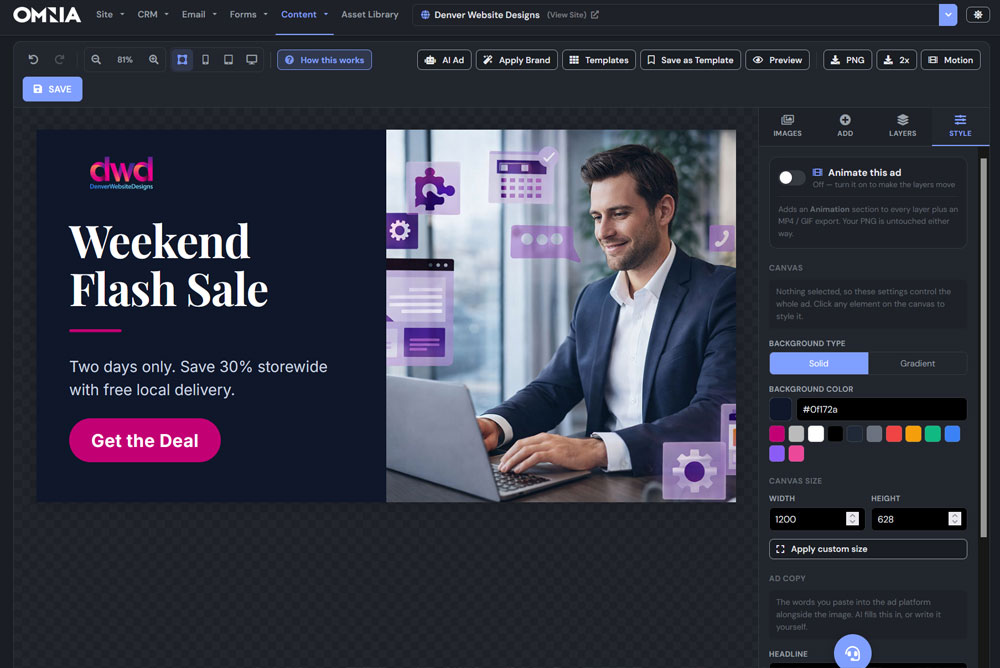
Ad & Image Studio
Content Ad/Image Studio
A drag-and-drop design canvas built into your website. Start from a template or let AI lay out the whole ad, then click any headline, photo or button to make it yours.
- AI writes the copy and designs the layout
- Apply Brand pulls in your site colors, fonts and logo
- Exact sizes for every social, display, email and print format
- Preview the ad in a real feed on phone, tablet and desktop
- Animate layers and export MP4 video or GIF
- AI images, stock photos and saved templates
Ad Post Distribution to All Social Media
Ad/Image Studio Publish to Social
Connect your accounts once. When an ad is ready, tick the accounts it should land on and post it now or schedule it for later. Each network gets the size made for it, and you get the live link to every post.
- X
- Threads
- Bluesky
- TikTok
- YouTube
- Google Business
- Post to several accounts in one click
- Post now or schedule a date and time
- Post text fills in from the ad copy and hashtags
- Links tagged automatically so analytics tracks every sale
- Animated ads post as video
- Every ad saved to your Ad Portfolio to reuse
A store that scales with you
From a handful of products to catalogs of more than 12,000 items, manage inventory, orders and store settings from the same login as everything else.
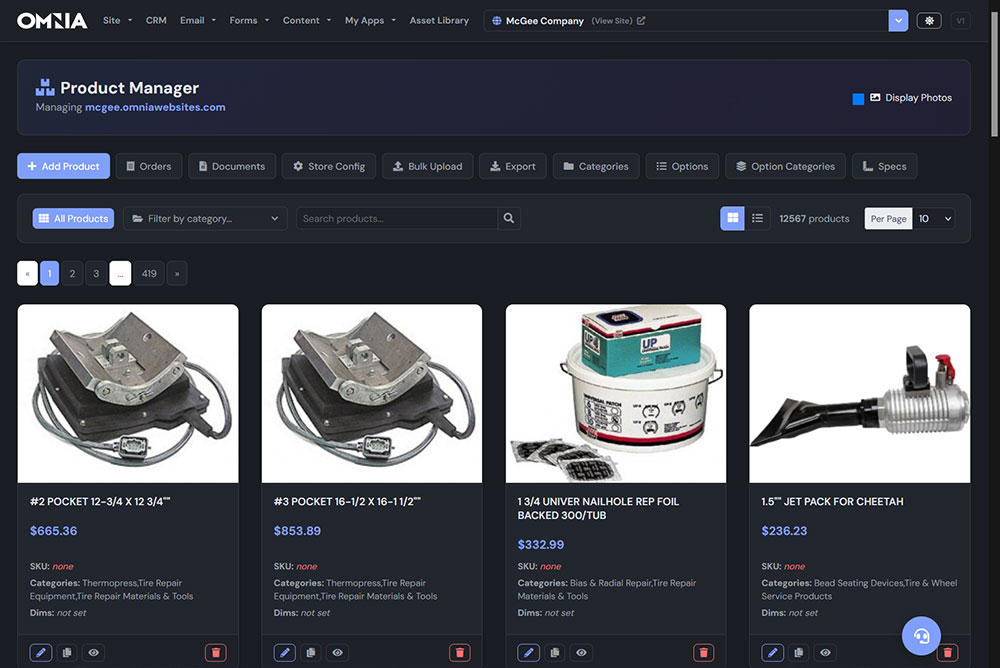
Product Manager
My Apps Product Manager
Add, edit and organize products with photos, pricing, categories and specs. Big catalog? Upload it in bulk.
- Grid and list views with fast search
- Categories, options and specs
- Bulk upload and export
- Product documents and store configuration
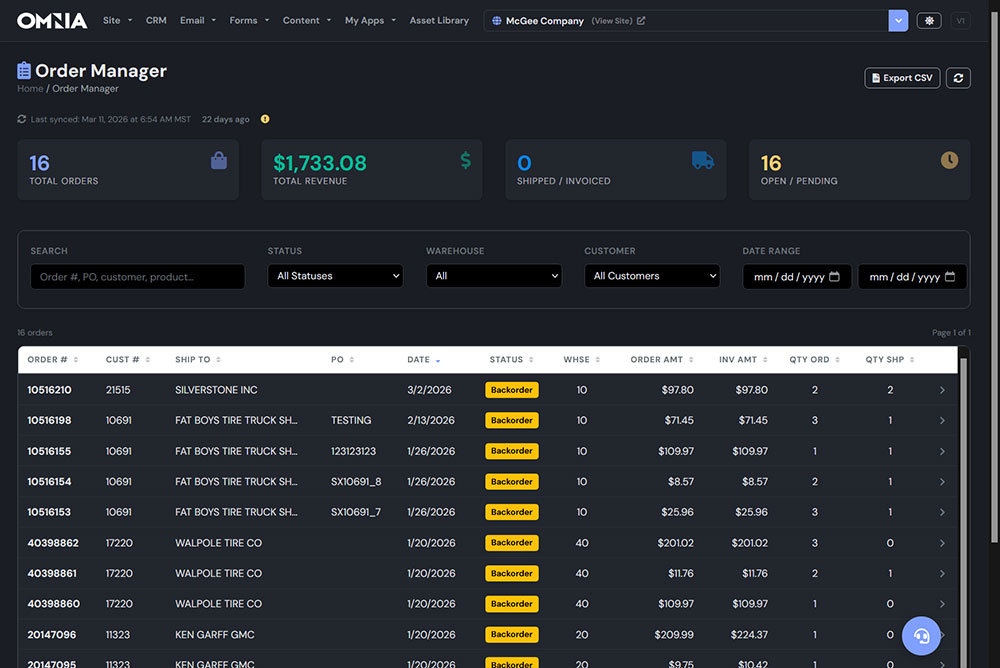
Order Manager
My Apps Orders
Every online order in one list, with totals up top and the filters you need to find any order fast.
- Total orders, revenue, shipped and pending
- Filter by status, warehouse, customer and date
- Order and invoice amounts side by side
- Syncs with your business systems and exports to CSV
More tools inside every plan
The dashboard keeps growing. Here is more of what is waiting after you log in.
Drip Campaigns
Automated email sequences that follow up with leads on your schedule.
Nurture Streams
Keep prospects warm with timed touches until they are ready to buy.
Calendar & Appointments
Book meetings, link your calendar and send reminders.
Visitor Analytics
See who is on your site, where they came from and what they viewed.
Events
Publish events with registration, capacity and confirmations.
Surveys
Collect customer feedback and review the results in one place.
Galleries
Photo galleries you can add to and reorder in minutes.
Testimonials
Showcase customer reviews anywhere on your site.
Job Listings
Post openings and collect applications without a job board.
Ad Campaigns
Run paid ads on Meta, LinkedIn, TikTok and more, and see what each one costs.
Locations
Manage every storefront or service area from one account.
Site Users & Portals
Private member areas with logins and role-based access.
One platform, not a patchwork
Most small businesses juggle a website builder, a CRM, an email service, a form tool and a scheduler, each with its own bill and login. Omnia replaces the stack.
Everything is connected
A form fill becomes a CRM contact, lands in your pipeline and joins the right email list automatically. No exports, no zaps, no copy and paste.
Real people behind it
When you need help, you talk to the Denver team that built your website, not a chatbot or a ticket queue on the other side of the world.
Works where you do
Manage your business from a laptop, tablet or phone, and preview every page at every screen size before it goes live.